Posts

Server-Side Document Generation

Image
Document Generation                  With Document Generation , you can generate contracts, proposals, quotes, reports, non-disclosure agreements, service agreements, and so on. Client-side document generation  requires a user interaction and generates documents using an OmniScript. Salesforce provides sample OmniScripts and Integration Procedures that you can use and customize to implement these capabilities. Server-side document generation   typically doesn’t require user interaction. Instead, a backend server processes requests to generate documents. Let’s examine the differences between client-side and server-side document generation.   Client-Side Document Generation  ...

Reusable Code in OmniScript - Lightning Web Components

Lightning Web Components are great for breaking down layouts and interfaces into small, reusable pieces. Step 1: Create Lightning Web Component BaseComponent is via a BaseComponent folder in the standard LWC folder of a SFDX project. Export and Import Inside baseComponent.js, we can define reusable functions and export them for use in other components. In the example below, I define a function called convertToArray and export it BaseComponent import { LightningElement } from 'lwc' ; import { OmniscriptBaseMixin } from 'vlocity_cmt/omniscriptBaseMixin' ; export default class BaseComponent extends OmniscriptBaseMixin ( LightningElement ) { } export function convertToArray ( obj ) { if ( obj instanceof Array ) { return obj ; } else { return [ obj ]; } } Child Component import { LightningElement , api , track } from 'lwc' ; import { OmniscriptBaseMixin } from 'vlocity_cmt/omniscriptBaseMixin' ; ...

Communicating between Independent LWC in Omniscript

Image
This is a simple example that shows a button that, when clicked, publishes a message. This shows how two separate custom LWCs can communicate with each other inside of an OmniScript. Below is the overall design using the Pub/Sub model. So, lets get started! Step 1: Create a LWC component and use below code to fire events with parameters to pass an omniscript and component to Community Page. Below is the HTML and JS code for reference. SampleLWCComponent.html < template > < lightning-button label = "Send Event" onclick = {handleClick} ></ lightning-button > </ template > SampleLWCComponent.js import { LightningElement } from 'lwc' ; import pubsub from 'vlocity_ins/pubsub' ; export default class SampleLWCComponent extends LightningElement { handleClick ( e ){ let accId = '0015g00000gWY8VAAW' ; pubsub . fire ( "handlePubSubEventChange" , "result" , { "accId" : ac...

Import third party JS library in OmniScript Custom Lightning Web Components

 Import third party JS library in OmniScript Custom Lightning Web Components This post explains how to import third-party libraries in omniscript custom lightning web components(lwc). We can not directly import the third party scripts in Lightning web components because Security purpose. We will get error as  "This page has an error. You might just need to refresh it. Error in $A.getCallback() [Assertion Failed!: Scoped imports not allowed when a runtime namespace is specified" Salesforce restrict the importing scripts from third-party content delivery sites like cdnjs, jsdelivr, etc.  Firstly, you need to download the scripts from third-party sites. Then upload the scripts in static resources. Syntax import { loadScript } from 'lightning/platformResourceLoader' ; import { OmniscriptBaseMixin } from 'vlocity_cmt/omniscriptBaseMixin' ; platformResourceLoader  have two methods  loadStyle , and  loadScript.  For both methods return type is Promise....

Efficient way to write apex code

Apex Performance Optimization Set.contains() vs. List.contains() Why minor collection choices dictate transaction scaling and CPU governor limits in Apex. "Guess what? Small programmatic choices matter immensely in multi-tenant environments." If you’re having a cup of tea, pause for a moment. The next two minutes will reveal a simple yet overlooked reality in Salesforce development. Lists and Sets are our absolute go-to collections during a typical development cycle. However, after looking at the mathematical reality behind how the compiler evaluates them, you will definitely double-check your code before deploying. The Benchmark Setup Let’s take two collection variants—a List<Integer> and a Set<Integer> —and load them with 100,000 identical elements. Which data structure yields faster lookup performance when running a .contain...

Salesforce Best Features available

1. Get Merged Body Without Extra Effort Use the renderStoredEmailTemplate method to get the merged email body automatically without manually replacing merge fields. EmailTemplate emailTemplate = [SELECT Id FROM EmailTemplate WHERE Name = 'Test1' LIMIT 1]; Messaging.SingleEmailMessage email = Messaging.renderStoredEmailTemplate(emailTemplate.Id, UserInfo.getUserId(), AccountObj.Id); System.debug(email.plainTextBody); 2. Business Hour Calculations Example in Apex This snippet checks whether a specific time falls within your organization's default business hours. public static Boolean checkBusinessHour() { // Business hour logic List<BusinessHours> defaultBusinessHours = [SELECT Id FROM BusinessHours WHERE Name = 'Default' AND IsDefault = TRUE AND IsActive = TRUE LIMIT 1]; // Find whether the time is within the default business hours return BusinessHours.i...

JWT (JSON Web Token)

Image
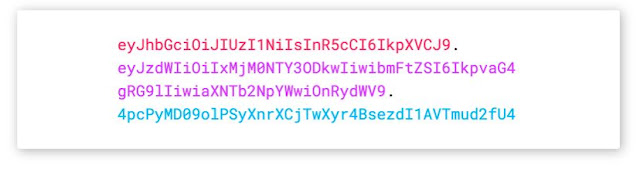
Introduction to JSON Web Tokens JSON Web Token (JWT) is an open standard ( RFC 7519 ) that defines a compact and self-contained way for securely transmitting information between parties as a JSON object. This information can be verified and trusted because it is digitally signed. JWTs can be signed using a secret (with the  HMAC   algorithm) or a public/private key pair using  RSA  or  ECDSA . When should you use JSON Web Tokens? Here are some scenarios where JSON Web Tokens are useful: Authorization: This is the most common scenario for using JWT. Once the user is logged in, each subsequent request will include the JWT, allowing the user to access routes, services, and resources that are permitted with that token. Single Sign On is a feature that widely uses JWT nowadays, because of its small overhead and its ability to be easily used across different domains. Information Exchange: JSON Web Tokens are a good way of securely transmitti...
Image
Shoot Your Custom Notifications Via Apex        Summer 19 bought a lot of surprises and one of the most enchanting one was that to send custom bell notifications from our inmate, the "Process Builder".       Custom notifications are the soul of the modern business. This feature allows you to send important information, via push to mobile or desktop alerts.    Notifications can be tailor made to inform users regarding any of the record update.  Custom Bell Notifications provide the flexibility of showcasing relevant information at the right time to our users.        All these involves just a handful of steps.       From setup, enter Custom Notifications in the quick find box.      Create a new custom notifications type, also define either desktop or phone to pop-up your notifications. You can select both the locations.        Hope that wa...