Top 10 Senior Salesforce Integration Interview Questions & Expert Answers (2026 Edition)
Salesforce Interview Questions Preparation
1. What are the core Salesforce Integration Patterns, and when should you choose one over the other?
The Answer:
Salesforce defines several distinct integration patterns based on timing, direction, and volume. A senior architect must choose the pattern that minimizes governor limit consumption while matching business requirements:
- Request and Reply (Synchronous): Salesforce invokes an external system API and pauses execution to wait for an immediate response.
- Fire and Forget (Asynchronous): Salesforce hands off a transaction payload to an external system or an internal queueing mechanism and resumes its thread immediately without waiting for a response.
- Batch Data Synchronization (Bulk): Exporting or importing millions of records on a scheduled cadence (typically nightly or hourly) rather than handling them record-by-record.
- UI Data Virtualization: Displaying real-time external data on a Salesforce page layout without ever duplicating or writing that data into the Salesforce multi-tenant database.
Scenario Example: When an agent pulls up a customer profile, Salesforce uses UI Data Virtualization via Salesforce Connect (OData) to read legacy ERP invoice history on demand. This saves massive data storage costs because millions of rows remain in the external database and are only fetched when viewed.
Key Takeaway: Default to asynchronous ("Fire and Forget") patterns unless the business process strictly dictates that the end-user must see an immediate confirmation from the external system before moving forward.
2. When should you choose an Event-Driven Architecture (Platform Events/CDC) over a traditional synchronous Apex Callout?
The Answer:
Traditional synchronous Apex callouts tightly couple Salesforce to third-party endpoints. If the external server goes down, experiences latency, or handles a massive traffic spike, Salesforce transactions freeze, leading to timeout errors and exhausted concurrent request limits.
Event-Driven Architectures (EDA) like Platform Events or Change Data Capture (CDC) decouple the systems entirely. Salesforce publishes an immutable event message to its internal Event Bus and finishes its database transaction instantly. The external middleware or endpoint subscribes to the stream and processes the data at its own pace.
Scenario Example: Instead of writing an Apex trigger that fires an HTTP REST callout to a shipping provider every time an order is marked "Ready to Ship," switch to publishing anOrder_Ready__ePlatform Event. If the shipping API goes down, the event remains safely stored on the Event Bus for up to 72 hours, allowing the system to catch up later using itsReplayId.
Key Takeaway: Use synchronous callouts for transactional operations needing immediate returns (like validating a credit card). Use event-driven streaming for decoupled orchestration across independent enterprise systems.
3. What are Named Credentials, and why are they considered an absolute security best practice?
The Answer:
Named Credentials abstract the integration endpoint URL, authentication configurations, and headers away from custom code. In standard development, developers used to store raw endpoints and authentication secrets in hardcoded variables, Custom Settings, or Custom Metadata, which required writing complex handshake algorithms in Apex.
Named Credentials handle the entire security handshake natively behind the scenes. When making a callout, Apex code simply references the Named Credential's developer name. Salesforce securely manages token refreshes, basic authentication headers, and client certificates without exposing secrets to developers or debug logs.
// Secure, modern way to initiate an HTTP Callout in Apex
HttpRequest req = new HttpRequest();
req.setEndpoint('callout:ERP_Payment_Gateway/v1/charge');
req.setMethod('POST');
Scenario Example: When migrating code from a staging Sandbox to Production, developers don't have to write dynamic code logic to switch betweensandbox.api.comandprod.api.com. They simply configure a local Named Credential in each environment with the same developer name, and the exact same Apex code works flawlessly across both systems.
Key Takeaway: Never hardcode keys, secrets, or endpoints in Apex or Custom Metadata. Named Credentials isolate authorization settings from code execution, enforcing clean separation of security duties.
4. How does the Salesforce Composite API optimize performance and limit consumption compared to standard REST resources?
The Answer:
The standard Salesforce REST API processes only a single object type per HTTP request. If an external client needs to create an Account, an associated Contact, and three related Case records, it would have to make 5 independent, sequential HTTP network round-trips. This burns through daily API limits and slows down client applications.
The Composite API allows an external application to bundle up to 25 separate sub-requests into a single JSON payload sent via a single HTTP request. The sub-requests execute sequentially on the Salesforce server. Crucially, subsequent steps can dynamically ingest the outputs (like a newly generated Record ID) of previous steps using reference strings.
{
  "compositeRequest" : [
    {
      "method" : "POST",
      "url" : "/services/data/v60.0/sobjects/Account",
      "referenceId" : "NewAccountRef",
      "body" : { "Name" : "Acme Corp" }
    },
    {
      "method" : "POST",
      "url" : "/services/data/v60.0/sobjects/Contact",
      "referenceId" : "NewContactRef",
      "body" : { "LastName" : "Smith", "AccountId" : "@{NewAccountRef.id}" }
    }
  ]
}
Scenario Example: A mobile sales application uses the Composite API to submit an offline order sync. It builds an Account and an Opportunity in one request. By referencing @{NewAccountRef.id} in the opportunity body, it links the records instantly without waiting for the network to send the account ID back down to the device first.
Key Takeaway: Use Composite API resources to minimize chatty network round-trips and preserve daily org API limits when integrating multi-object transaction flows.
5. You need to migrate or continuously sync 5 million records from an ERP into Salesforce. How do you design this architecture?
The Answer:
Processing 5 million records via standard synchronous REST or SOAP endpoints will immediately trigger timeout exceptions, lock records, and deplete the company's daily API limits. A high-volume data architecture requires three distinct pillars:
- Bulk API 2.0: This engine processes data asynchronously. Instead of breaking data down into thousands of manual request chunks, Bulk API 2.0 allows you to simply upload a massive CSV file. Salesforce automatically manages optimal batch chunking, parallel processing, and resource routing behind the scenes.
- External IDs for Upserting: The target object in Salesforce must have a custom field marked as an External ID and Indexed. This enables the incoming payload to use the Upsert operation, allowing Salesforce to insert new rows or update existing records based on the ERP key in a single database pass, eliminating the need to query records first.
- Concurrency Control & Row Locking Mitigation: Sort incoming datasets by parent relationships (e.g., sorting Contacts by
AccountId) before submitting. This avoids parallel worker threads from trying to update multiple child records under the same parent simultaneously, preventingUNABLE_TO_LOCK_ROWdatabase failures.
Scenario Example: A nightly synchronization uploads millions of updated invoicing history rows into a custom object. By using Bulk API 2.0 and grouping rows by Account ID, the integration engine runs smoothly in parallel processing chunks without generating a single row-lock error.
Key Takeaway: High-volume data loading demands asynchronous processing via Bulk API 2.0 combined with indexed External ID keys to ensure database selectivity and stability.
6. What is the OAuth 2.0 JWT Bearer Flow, and why is it preferred for server-to-server integrations?
The Answer:
Most standard OAuth flows (like the Authorization Code flow) require interactive, human intervention where an administrator logs in via a web browser and clicks an "Approve Access" button. This approach fails for automated, background server integrations.
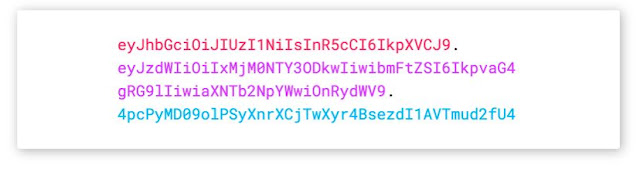
The OAuth 2.0 JWT (JSON Web Token) Bearer Flow provides a highly secure, headless, machine-to-machine authentication framework. A Connected App is configured in Salesforce and embedded with a public digital certificate. The external integration server builds a JSON payload, signs it using its local private key, and exchanges it at the Salesforce token endpoint for an immediate access token—requiring zero interactive human logins.
+------------------+                    +--------------------+
|  External Server |                    | Salesforce Cloud   |
|                  |                    |                    |
| 1. Generates JWT |                    |                    |
| 2. Signs w/ Priv |------------------->|                    |
|    Key           |  Post JWT Assert   | 3. Validates Assert|
|                  |                    |    w/ Pub Cert     |
|                  |<------------------- 4.="" access="" issues="" pre="" token="">


      Scenario Example: An enterprise ETL middleware platform (like MuleSoft) runs a scheduled integration job at 2:00 AM. It generates a signed JWT token, authenticates instantly against Salesforce, performs its data synchronization, and closes the connection without needing a system admin to be awake to type in a verification code.

    Key Takeaway: Use the OAuth 2.0 JWT Bearer Flow for automated background applications to achieve secure, certificate-signed authentication without manual interaction bottlenecks.
7. What are the key Apex Governor Limits associated with callouts, and how do you circumvent them?
The Answer:
Because Salesforce is a multi-tenant architecture, the platform enforces strict guardrails on synchronous transactions to prevent a single bad piece of code from locking up shared server threads:
- Max Callouts: A single synchronous transaction can execute a maximum of 100 callouts.
- Max Timeout: The maximum cumulative timeout duration for all callouts within a single execution context is 120 seconds.
- DML Restriction: You cannot perform Database Manipulation Language (DML) statements (like
insertorupdate) before executing a callout in the same transaction thread. Doing so throws aSystem.CalloutException.
To bypass these restrictions, you must shift your integration to an asynchronous context, such as Queueable Apex or Batch Apex. If you must combine DML operations and callouts, always structure your code logic so that all HTTP web service transactions complete fully before executing any database changes.
Scenario Example: If a user checks a box on an Account record that triggers an update across 50 related Contact records—and each contact requires an individual API validation check—running this synchronously will quickly risk a timeout exception. Wrapping the execution loop inside a Queueable Apex class grants a fresh, decoupled set of async limits per execution batch.
Key Takeaway: Respect the sequential boundaries of Salesforce transactions: compute your payloads, perform your external HTTP network callouts first, and commit your local DML database writes last.
8. What is Idempotency, and how do you design an integration to enforce it?
The Answer:
Idempotency means that an API request can be transmitted and executed multiple times by a client, but it will yield the exact same database result as running it precisely once. In integration environments, network issues can drop packets after a target system has completed a transaction but before the client receives the HTTP 200 OK response. The client assumes a failure occurred and retries the request. Without idempotency controls, this creates duplicate records.
To design an idempotent integration:
- Idempotency Keys: The calling client generates a unique transaction key (e.g., a UUID or record ID combined with a timestamp) and passes it inside the custom HTTP header (like
X-Idempotency-Key). - Server Checking: The receiving system checks its database or a fast cache layer for that unique key. If the key exists, it skips record generation and returns the original cached API response. If it doesn't exist, it processes the record normally and logs the key.
Scenario Example: Salesforce calls an external billing gateway to charge a client's credit card. The gateway charges the card, but a network drop occurs. Salesforce retries the request 5 seconds later. Because Salesforce passes the same unique order token in the header, the billing gateway flags the duplicate request and prevents charging the customer's credit card twice.
Key Takeaway: Never design integrations assuming the network is 100% reliable. Always build idempotency safety nets into any integration handling financial transactions or immutable data creation.
9. How do you implement robust error-handling and resilience for Apex callouts when third-party systems fail?
The Answer:
Senior engineers design integrations expecting systems to fail. A robust integration architecture isolates failure points using strict catch hierarchies, evaluates status returns, and prevents data drops:
- Targeted Try-Catch Blocks: Code must catch explicit
System.CalloutExceptioninstances (to trap network breaks, DNS failures, or connection timeouts) separate from regular generic code exceptions. - HTTP Status Verification: Do not assume a successful network handshake means valid data. Code must parse the explicit status codes, routing responses matching 200 or 201 to success handlers, while isolating 4xx (client configuration errors) and 5xx (server drops) for error logs.
- Asynchronous Retries & Finalizers: For asynchronous Queueable executions, implement the
System.Finalizerinterface. If the queueable job fails unexpectedly due to a system drop, the attached finalizer catches the exception, creates an entry in a customIntegration_Error__clog table, and programmatically schedules a retry job using an exponential backoff cadence.
Scenario Example: A middleware system undergoes a sudden crash. Salesforce attempts its scheduled transaction sync and gets an HTTP 503 Service Unavailable. Instead of failing silently or crashing user sessions, the custom error-handler catches the state, logs the exact response payload for debugging, and gracefully alerts the integration team via an automated notification object.
Key Takeaway: A successful integration isn't judged by how it handles perfect data on a working network, but by how cleanly it captures failures, tracks issues, and keeps data accurate when external systems crash.
10. When should you use Salesforce "External Services" instead of writing a custom Apex HTTP Callout class?
The Answer:
Salesforce pushes a modern, configuration-first design methodology. External Services allows you to connect to an external REST web service completely declaratively, removing the need to write custom Apex HTTP wrapper modules.
An administrator obtains an OpenAPI-compliant (Swagger) JSON schema documentation file from the external system vendor and uploads it directly into Salesforce via the Setup menu. Salesforce automatically parses the endpoints, inputs, and output attributes defined in the schema and transforms them into native low-code actions. These actions can then be dragged, dropped, and configured directly inside Salesforce Flow or used by Einstein Agents.
| Feature Criterion | External Services (Low-Code) | Custom Apex Callout (Pro-Code) |
|---|---|---|
| Development Speed | 🚀 Extremely Fast (Drag & Drop) | ⏳ Slower (Requires code & test coverage) |
| Maintenance | Automatically updates if schema re-imported | Manual code changes required |
| Payload Complexity | Best for standard JSON REST structures | Required for legacy SOAP, binary blobs, or custom encryption |
| Error Handling | Basic declarative fault paths | High-grain programmatic try-catch control |
Scenario Example: A business team wants Salesforce to call an external weather API during an automated flow to check environmental conditions before dispatching service technicians. Instead of assigning a developer to write code, an administrator imports the weather service's OpenAPI schema into External Services, making the weather parameters instantly configurable inside a standard Record-Triggered Flow.
Key Takeaway: Leverage low-code External Services for standard, well-documented REST APIs to maximize development agility. Reserve custom programmatic Apex callouts for legacy payloads, binary data manipulation, or highly complex multi-stage transactional orchestration.



Comments
Post a Comment